Comparisons
Can Gemini Translate a Conversation in Real Time? Where Google Put It (2026)
Gemini 3.5 Live Translate runs in Google Translate, Google Meet, AI Studio and a new Gemini Live setting. Where to find each, and why yours may be missing.
- comparison
- live translation
Ask whether Gemini can translate a conversation and you get three different answers, depending on where you look. On 1 September 2026, Let's Data Science, summarising an Android Authority report, wrote that Gemini Live on Android had started a gradual server-side rollout of a "Turn on live translation" setting, and that it may not appear for every user at once. On 26 August 2026, a developer on Google's AI forum reported that the preview of Gemini 3.5 Live Translate on the free tier "stopped behaving like a real-time service", with audio and captions falling more than a minute behind. And Google Meet's new 63-language speech translation only started reaching Scheduled Release domains on 2 November 2026.
So if you opened the Gemini app and found no translation button, nothing is broken. Google's live translation is real, but it lives in four places, and only one of them is the Gemini app.
One model, four places
On 9 June 2026, Google announced Gemini 3.5 Live Translate, a speech-to-speech model. Google says it detects 70+ languages, handles mixed-language input without manual settings, and stays a few seconds behind the speaker. The same post named where it would go: developers in Google AI Studio and the Gemini Live API, business customers in Google Meet, and everyone in the Google Translate app on Android and iOS. The Gemini Live setting came later and is still rolling out.
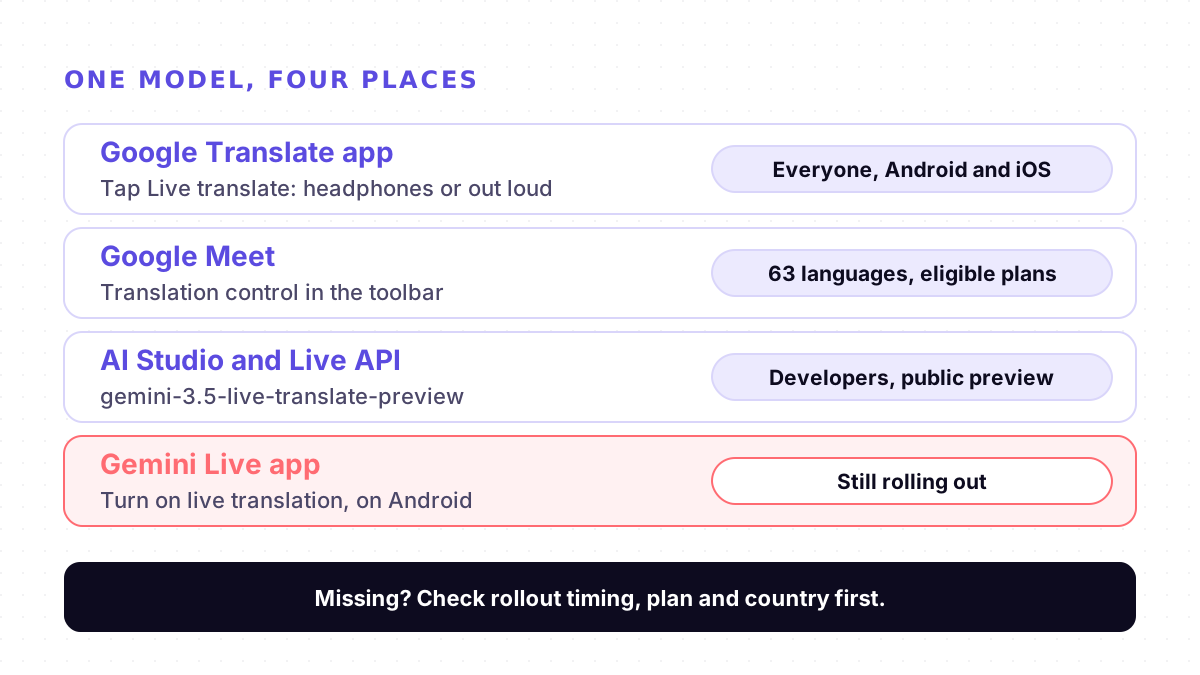
- Google Translate app. The place for a face-to-face conversation. Live translate with headphones reached iOS on 26 March 2026, and Google added more countries, including France, Germany, Italy, Japan, Spain, Thailand and the U.K. Google's post does not give the full country list.
- Google Meet. Speech translation in meetings. On 22 October 2026, Google expanded it to 63 languages, powered by Gemini 3.5 Live Translate, with automatic language detection. Each participant turns it on for themselves.
- Google AI Studio and the Live API. For developers building their own apps, as the model `gemini-3.5-live-translate-preview`, in public preview.
- Gemini Live. A "Turn on live translation" setting in Gemini Live's voice settings on Android, rolling out gradually from September 2026. In the report's test, it detected Hindi and showed English captions while the speaker kept talking. No device list, language list or completion date has been published.
How to start it in Google Translate
These steps are from Google's Translate help page for Android.
1. Update the Translate app. Google asks for the latest version and does not name a version number.
2. Connect headphones if you want to listen privately. Google says any pair works, and you can also hold the phone to your ear.
3. Tap Live translate at the bottom of the app.
4. Choose a mode and both languages. Listening mode plays the translation in your headphones. Conversation mode plays it out loud, and you take turns speaking. There is also a text-only mode.
5. Talk. Google says the microphone detects when one language stops and the other starts. You can keep using live translate in the background.
Why yours is missing or slow, and what to do
1. No translation in the Gemini app. It is a gradual server-side rollout on Android. There is nothing to switch on until it reaches your account, and Google's Gemini Live help page did not mention translation when we checked on 4 November 2026. Use the Translate app meanwhile.
2. No translation control in Google Meet. Check the timing first: Rapid Release domains got it from 22 October 2026 (1 to 3 days to appear), Scheduled Release domains from 2 November (up to 15 days). Then the plan: Business Standard and Plus, Enterprise Standard and Plus, Google AI Pro and Ultra, Frontline Plus, Google AI Pro for Education, AI Expanded Access and AI Ultra Access. Then ask your admin whether the Gemini for Meet setting is on, and update the Meet app on your phone.
3. It works in some meetings and not others. Google lists what is not supported: live streams, meeting recordings, client-side encrypted meetings, dial-in or third-party interoperability calls, and adaptive audio. Speech from Meet conference room hardware is not translated for others. Meetings are limited to 90 minutes of translation on base Workspace and Google AI Pro plans, and up to 8 hours on the higher tiers.
4. No Live translate in the Translate app. It has rolled out country by country. Update the app, and if it still is not there, your country may not be covered yet.
5. You need it offline. Only on Pixel 9, 10 and 11, and only for English paired with Italian, Spanish, French, German, Portuguese, Hindi, Russian, Swedish, Japanese or Indonesian. Download the languages before you travel.
6. It falls behind or guesses the wrong language. A few seconds of lag is how the model is built. Google's developer docs also say language detection struggles with heavy accents, similar languages such as Spanish and Portuguese, and rapid switches, and that not all background audio may be ignored. Let each person finish a sentence and move away from noise. Our guide to why live translation lags explains where the seconds go.
7. You are a developer and the stream stalls. The August 2026 forum report described the free tier falling behind with no error returned, while the same test on a paid key did not reproduce it. The poster moved live sessions to the paid tier. No reply from Google was visible when we checked.
Gemini, ChatGPT and a dedicated translator
Gemini's translation is now closer to a translator than an assistant: in Translate and Meet it detects languages and speaks continuously. ChatGPT works differently, as a voice assistant you ask to translate, which we covered in Can ChatGPT translate in real time?. How Apple's, Google's and browser tools split the job is in Apple vs Google vs browser tools, and the face-to-face comparison is on Mingle vs Google Translate conversation mode.
Where Mingle fits
Mingle is our product. It runs in the browser on any phone or computer with nothing to install, translates speech in 60+ languages in any combination (the list is on our Languages page), and guests can start without an account. You can share a session by QR code so the other person follows on their own phone in their own language; sharing needs a free account and joining needs none. For meetings, Mingle runs its own room that people join by link, and each person picks their language. It does not join Google Meet calls.
Google's tools do things Mingle does not. Google Translate keeps translating in the background, while Mingle needs the screen on because mobile browsers pause the microphone when the screen locks. Pixel owners can translate some pairs offline, and Mingle has no offline mode. Free Mingle sessions run up to 5 minutes, and like Gemini it is machine translation, not an interpreter.
Sources
Checked on 4 November 2026.
- Let's Data Science: Gemini Live Starts Rolling Out a Live Translation Setting (1 September 2026, summarising Android Authority)
- Google AI Developers Forum: Gemini 3.5 Live Translate preview started having long audio and text translation delays on the Free tier (26 August 2026)
- Google: Fluid, natural voice translation with Gemini 3.5 Live Translate (9 June 2026)
- 9to5Google: Gemini 3.5 Live Translate rolling out to Google Meet and Translate (9 June 2026)
- Google Workspace Updates: Real-time speech translation in Google Meet expands to 63 languages (22 October 2026)
- Google: Transform your headphones into a live personal translator on iOS (26 March 2026)
- Google Translate Help: Hear live speech to speech translations with live translate
- Google AI Studio docs: Live translation with Gemini Live API
- Gemini Apps Help: Talk naturally with Gemini Live
Drafted with AI assistance, edited and fact-checked by Tabish Irfan. How we write and check articles
FAQ
Can the Gemini app translate a conversation?
It is starting to. On 1 September 2026, a report based on Android Authority's findings said Gemini Live on Android had begun a gradual server-side rollout of a "Turn on live translation" setting, which may not appear for everyone at once. Google's Gemini Live help page did not mention translation when we checked on 4 November 2026. Until the setting reaches you, use Live translate in the Google Translate app.
Why don't I see speech translation in Google Meet?
Check four things. Timing: Rapid Release domains got the 63-language version from 22 October 2026, Scheduled Release domains from 2 November with up to 15 days to appear. Plan: Business Standard or Plus, Enterprise Standard or Plus, Google AI Pro or Ultra, and a few education and add-on plans. Admin: the Gemini for Meet setting must be on. App: update Meet on your phone.
How many languages does Gemini live translation support?
Google's announcement and its developer docs say 70+. Google Meet's October 2026 update says 63 languages for speech translation. The Google Translate help page has its own list. The number depends on the product, so check the list in the one you use.
Does Gemini live translation work offline?
Mostly not. The Google Translate help page says you can download languages for offline live translation only on Pixel 9, 10 and 11, for English with Italian, Spanish, French, German, Portuguese, Hindi, Russian, Swedish, Japanese or Indonesian. Everywhere else it needs a connection.
Why does the translation lag or stop?
Some lag is by design: Google says the model stays a few seconds behind the speaker. Its developer docs add that language detection struggles with heavy accents, similar languages such as Spanish and Portuguese, and rapid switches. A developer reported in August 2026 that the free API tier fell more than a minute behind, while the paid tier did not.
Can the other person follow the translation on their own phone?
In the Google Translate app, the conversation runs on one phone, out loud or in headphones. In Google Meet, every participant turns translation on for themselves inside a meeting. Mingle, our product, runs in the browser: you share a session by QR code and the other person follows on their own phone with no app or account.
Keep reading
Related posts
Comparisons Can ChatGPT Translate a Conversation in Real Time? (2026)
Yes: ask ChatGPT Voice to translate and it keeps going until you stop it. Where it works, where it breaks with two people, voice limits by plan, alternatives.
6 min read
Comparisons Apple Live Translation vs Google vs Browser Tools: Who Actually Needs What
Apple Live Translation, Google Conversation Mode, translator earbuds and browser tools solve different problems. Who should use what in 2026.
5 min read
How it works Can Schools Trust AI Translation With Parents? How to Catch the Mistakes
AI translation sounds fluent, so its mistakes are hard to spot. What educators told Education Week in September 2026, and checks that catch errors.
7 min read
Try live translation free
No app install. Any phone. 60+ languages.
Start free session