How it works
Can Schools Trust AI Translation With Parents? How to Catch the Mistakes
AI translation sounds fluent, so its mistakes are hard to spot. What educators told Education Week in September 2026, and checks that catch errors.
- live translation
- how-to
- explainer
Schools now use AI to talk with parents who do not speak English, and the people doing it are not sure how far to trust it. On 21 September 2026, Education Week published a report by Alyson Klein asking that question directly. A middle school nurse in New York's Hudson Valley described using a translation app to reach parents about injuries and vaccination records. The district's technology director told the paper there is "a little bit of blind faith" in it, and that the district checks translations with a native speaker when it can, but not always, because some home languages have no speaker on staff.
The sharpest warning came from Belle Li, a researcher at Purdue University. As Li put it, AI translation is so fluent that it is harder to notice a miscommunication, which gives educators an "illusion of accuracy." A July 2026 article in The Learning Standard made the same point, describing a June 2026 study in Contemporary School Psychology that compared Google Translate and ChatGPT-4o with a professional translator on psychoeducational report summaries: all three made errors, and the automated ones carried their own risk.
This guide covers why the mistakes are hard to see, how to match the checks to what is at stake, and what changes when the conversation is spoken rather than written.
Why fluent translation hides its mistakes
When the output reads smoothly, a wrong word sits inside text that looks right, and nobody stops to question it. The examples educators gave Education Week are small words with real effects:
- "Worried" coming out as a word that suggests a dire situation.
- "Might" becoming "will", which turns a possibility into a promise.
- A friendly tone producing Spanish *tú* where *usted* was meant.
- "Senior" (a 12th grader) translated as a senior citizen, and "free" (no cost) as free in the sense of liberated.
- Times: some languages, such as French and French Creole, do not use a.m. and p.m., a detail tools can miss.
- Idioms: a literal "It would break my heart" can read like a medical event.
One case Education Week retold is a sign from Galax City Public Schools in Virginia during COVID-19. "Thank you for remaining in your car" went through Google Translate and came out in Spanish as thanks for keeping *los restos*, the remains, in your car. The English-learner lead there traced it to the tool reading "remain" as a noun instead of a verb.
Li also told Education Week that accuracy is better between widely used languages such as English, Chinese, Spanish and French than for lower-resource languages such as Swahili, Lao or Yoruba, and that tools can still struggle even between English and Spanish. And because AI tools try to "improve" text, Li said, the line between translating and rewriting is getting blurry.
Match the check to the stakes
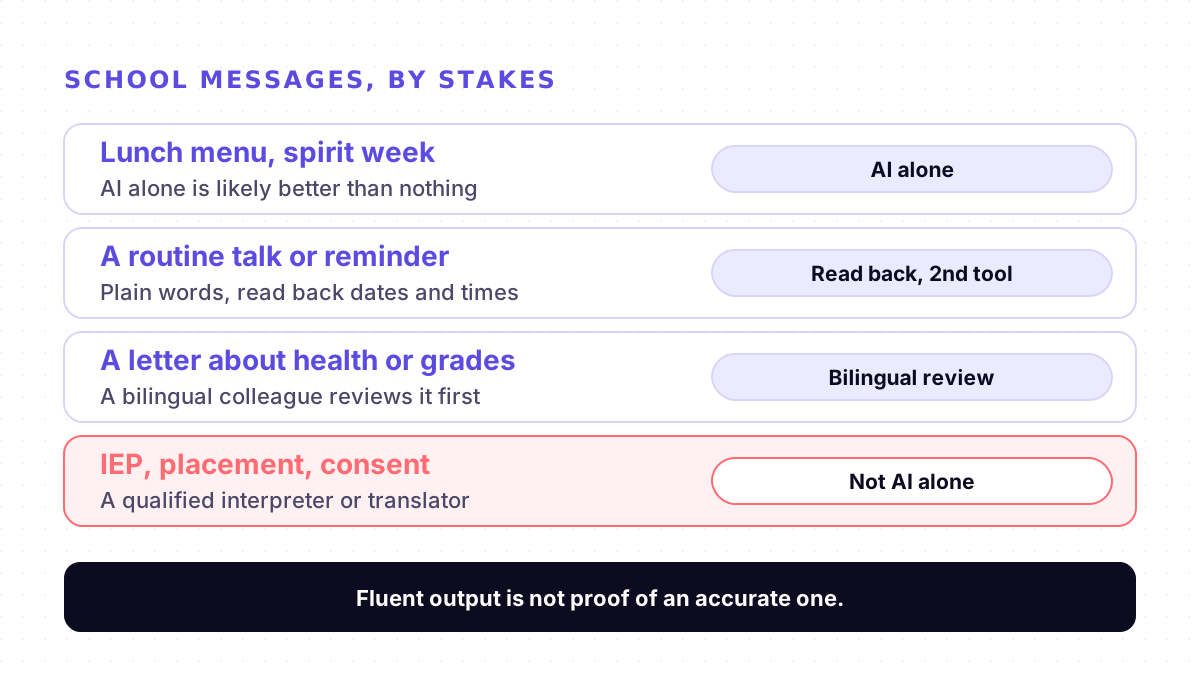
Li's advice was that the level of human oversight should depend on the stakes. Lunch menus and the timing of spirit week are low-stakes, and AI is likely better than nothing there. IEPs and academic placement, by Li's account, should never be translated by AI alone. Amelia Vance of the Public Interest Privacy Center put the other end plainly: sharing a badly wrong high-stakes document could cost someone their job, or lead to lawsuits.
Seven checks that catch most errors
1. Write the way you would speak to a newcomer. The nurse's rule: no euphemism, no slang, be to the point, be brief. Fayette County's family engagement director added school jargon to the list, giving "switching our diagnostic assessment from MAP to iReady" as an example.
2. Give the tool the context. Li suggests telling an AI tool why you are writing, the tone you want, and that you are a teacher writing to a parent.
3. Back-translate with a different tool. Translate the output back into English with a second tool and compare it with what you meant. A "will" where you wrote "might" shows up quickly.
4. Read back every date, time and amount. Spell out times in a way that does not depend on a.m. and p.m. Names need the same care: our guide on why live translators get names wrong covers how to get them through.
5. Have a bilingual person review anything important. The experts Education Week spoke to agreed that a district translator or a bilingual staff member should review AI-translated materials before they go home, at least ideally.
6. Say that you used AI. Li recommends being transparent. Many parents know AI makes mistakes, and telling them invites them to ask when something reads oddly.
7. Use a tool your district has a privacy agreement with. Education Week reported that without an agreement, which nearly always means a paid plan, student data are not secure. In the Croton-Harmon district, the nurse had first signed up for a free personal account, and the district's technology director moved the nurse to a competitor that agreed to the district's student-data standards.
The Learning Standard adds one for families: parents can ask the principal whether a bilingual staff member reviews automated letters about grades, discipline or health before they are sent.
When the conversation is spoken
Most of the reporting is about written messages, but Education Week also notes that districts use handheld devices and earbud tools for real-time translation during meetings, and the nurse said the district still needs a secure way to talk with parents by phone in real time about urgent medical situations.
Spoken translation has one advantage over a letter: the parent is right there and can react. Use it. Ask them to repeat the next appointment back to you, pause after each point, and watch for a puzzled face, which is often the first sign that a word went wrong. Do not hand the job to the student: our parent-teacher meetings guide explains why, and how to set up a routine conference. If your school used Microsoft Translator's shared conversations for this, our post on that feature covers what to use now.
Where Mingle helps, and where it does not
Mingle is our product, a live voice translator that runs in the browser. At a routine conference, you sign in and tap Share session, and the parent scans the QR code and picks their language on their own phone, with no app and no account. You speak normally, read their questions in English, and they read your answers in their language or hear them read aloud. It covers 60+ languages in any combination, and a parent who cannot come in can join a Mingle meeting by link for up to an hour.
What it does not do matters as much here. Mingle is machine translation, not an interpreter, and it can make the same kinds of mistakes described above, so the read-backs still apply. It is not for IEP or other special education meetings, discipline, or anything a parent has to consent to. It does not translate letters, forms or report cards. It is not HIPAA compliant, it needs an internet connection, and free sessions run up to 5 minutes. Ask your principal or district technology office whether it is an approved tool before you use it with families.
Sources
Checked on 4 November 2026.
Drafted with AI assistance, edited and fact-checked by Tabish Irfan. How we write and check articles
FAQ
Is AI translation accurate enough for messages to parents?
For everyday, low-stakes messages it is usually better than nothing, which is how the educators Education Week interviewed in September 2026 described it. The risk is that the output reads smoothly even when a word is wrong, so a misunderstanding is hard to notice. Add checks in proportion to what is at stake, and keep a person in the loop for anything important.
How can I check a translation if I do not speak the parent's language?
Write short, plain sentences without slang or jargon. Translate the result back into English with a different tool and compare it with what you meant. Read back every date, time and amount, and write times without relying on a.m. and p.m. For anything that matters, ask a bilingual colleague or the district's translator to review it before it goes home.
Can AI translate an IEP or special education meeting?
It should not be the only translation. The Purdue researcher Education Week quoted said IEPs and academic placement documents should never be translated by AI alone. In US public schools, special education meetings call for the district's qualified interpreter, and so does anything a parent has to consent to. Ask your district's special education office how to book one.
Should teachers tell parents they used AI to translate?
Yes. The researcher Education Week quoted advised being transparent about using AI, noting that many parents know AI makes mistakes and may appreciate the effort. Telling them also invites them to ask when something reads oddly, which is how a wrong word gets caught.
Is it safe to put student information into a free translation app?
Not by default. Education Week reported that unless an app has an agreement with the district, which nearly always means a paid subscription, student data are not secure. In one New York district, a nurse's free personal account turned out to have no privacy agreement, and the district's technology director moved the account to a tool that met the district's standards. Ask your district which tools are approved.
Can I use live voice translation at a parent-teacher conference?
For a routine conference, yes, if your district approves the tool. With Mingle, the parent scans a QR code and picks their language on their own phone, with no app and no account, and you both speak normally. Read back dates and names as you go. It is machine translation, not an interpreter, so it is not for IEP, discipline or consent conversations.
Keep reading
Related posts
Guides How to Translate a Phone Call in Real Time: iPhone, Pixel, Galaxy and Teams
Translate a phone call live on iPhone, Pixel, Galaxy or Teams: where to turn it on, which languages each covers, and what to do when yours is missing.
6 min read
Guides How to Have a Real-Time Translated Conversation in Your Browser (2026 Guide)
Step-by-step guide to a real-time translated conversation in your mobile browser: no app install, on one shared phone or two. What each setup needs, in 2026.
5 min read
Comparisons Can Gemini Translate a Conversation in Real Time? Where Google Put It (2026)
Gemini 3.5 Live Translate runs in Google Translate, Google Meet, AI Studio and a new Gemini Live setting. Where to find each, and why yours may be missing.
7 min read

Try live translation free
No app install. Any phone. 60+ languages.
Start free session