Guides
Live Translate Voice Keeps Changing? Why the Translated Voice Switches From Male to Female
Google's Live translate switching between male and female voices, or ignoring the voice you picked? Why the voice copies the speaker, and what to try.
- troubleshooting
- speech-to-speech
The voice in Google Translate's Live translate is not supposed to be a fixed robot voice. It is supposed to sound like the person talking. Sometimes it gets that wrong in a very obvious way. On 26 October 2026, a Pixel 11 Pro owner posted on the Google Translate Community that they use Pixel Buds Pro 2 for English to Russian in Listening mode, and that the feature works "extremely well" except for one thing: even when only one person speaks, the translated voice randomly switches between male and female, sometimes several times in one conversation. They also felt that one voice gave accurate translations while the others made more mistakes. A Google Product Expert replied the same day that it looks like a test run from Google, outside the user's control, and suggested sending feedback with the audio file.
A month earlier, on 16 September 2026, another Android user reported a related problem in a separate thread: the female voices they selected work in text mode, but Live mode speaks with a male voice.
Both reports have the same root. Here is why the voice changes, and what you can and cannot do about it.
Why the voice changes: it copies the speaker
In June 2026, Google announced that its Gemini 3.5 Live Translate model was rolling out in the Google Translate app on Android and iOS. Google says the model generates translated speech that "preserves the speakers' intonation, pacing and pitch", and that with headphones it "mirrors the speaker's tone". So Live translate does not pick a voice once and keep it. It keeps guessing what the speaker sounds like and builds the translated voice from that.
Google's developer documentation for the same model is frank about the weak spots. Under Limitations it says voice replication can be inconsistent, and names three cases:
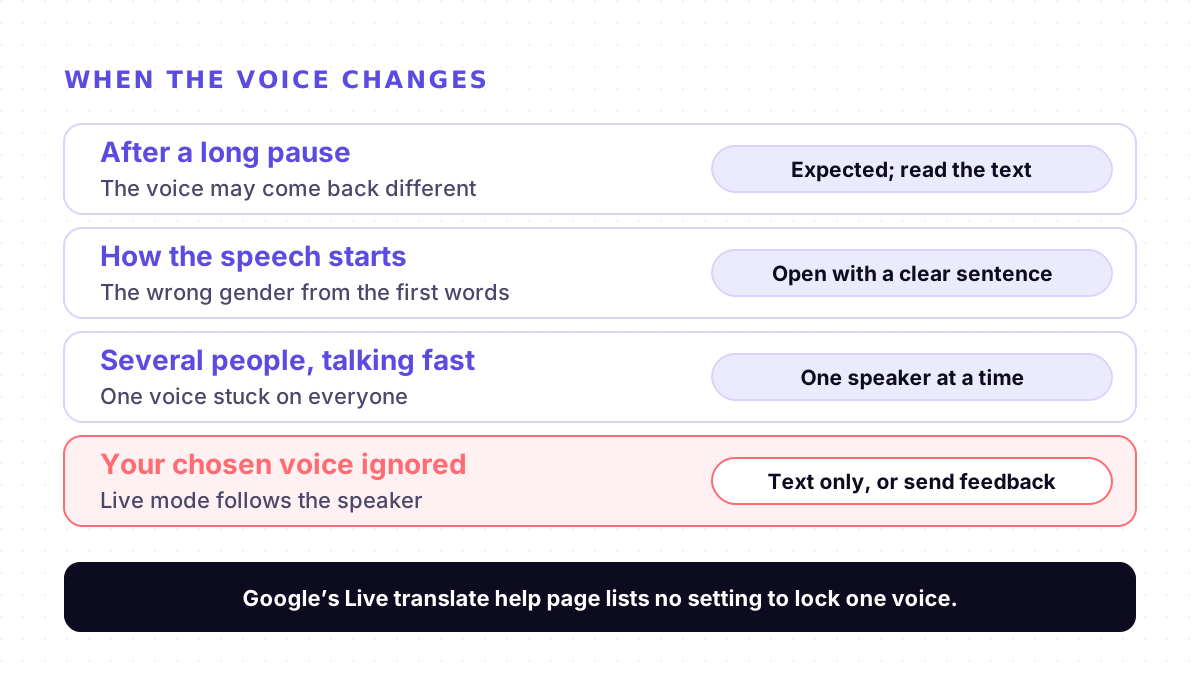
- After long pauses. Voices might shift when speech resumes.
- At the start of speech. The model may assign the wrong gender based on how the speech starts.
- With several fast speakers. It may get stuck on one voice during rapid multi-speaker conversations.
That matches both reports. A male voice for a female speaker, or a voice that flips mid-conversation with one speaker, is the model's guess going wrong, not a setting you changed. It also explains the September report: the voice you choose for text translations is a separate setting, and the help page for Live translate does not mention it.
Voice gender and word gender are two different problems
A voice that switches gender is one thing. Translated words with the wrong grammatical gender are another. Google Meet's help page for Speech Translation, which uses the same model, lists both kinds of slip separately: the translated voice style may change, and "the gender of nouns may be incorrect". In languages like Russian, Spanish or Arabic, a wrong gender in the words can change who a sentence is about, which a wrong voice does not. So when something sounds off, read the text. The voice is the last step in the chain, after recognition and translation; our speech-to-speech explainer walks through each step.
What to try
There is no setting that locks one voice. Google's Live translate help page lists Listening, Conversation, Text only and Custom settings, and nothing about voices. These steps work around the problem; none is an official fix.
1. Read the text when the words matter more than the voice. Text only mode plays no audio, and Custom settings lets you choose text only, speaker or headphones. Google's help page says you can tap any part of the text to hear that translation.
2. One person at a time. The docs say the voice can get stuck when several people talk fast. In Google Meet, the help page advises waiting for the translation symbol on the speaker's tile to disappear before you reply.
3. Start each turn with a full, clear sentence. The docs say the gender can be assigned from how speech starts. Starting cleanly, rather than with a cough or a half word, is worth trying. Google does not promise that it helps.
4. Expect a change after a long silence. If the voice comes back different after a pause, that is the documented behaviour. If it stays wrong, pause and resume with Speak, or tap Back and start Live translate again. Google does not say whether this resets the voice.
5. Check your phone's text-to-speech voice. For the voice you picked being ignored, a Google Product Expert suggested clearing the Translate app's cache and checking the text-to-speech settings and voice data in the phone's Settings app. That may fix voices in text mode; Google does not say whether Live translate uses them.
6. Send feedback, with a recording if you can. In the app, tap Settings, Send feedback, Get started. The Product Expert in the October thread asked for the audio file to be included. Add your phone, headphones and languages.
If Live translate is stalling, looping or hearing words nobody said, that is a different set of bugs; see our Live translate fixes.
Where Mingle fits
Mingle is our product. It runs in the browser on any phone or computer with nothing to install, translates speech in 60+ languages in any combination, and guests can start without an account. Each person reads the other in their own language on screen, as text, so the words are always there to check. Read Aloud is a toggle: turn it on to hear translations on the speaker or in your earbuds, or leave it off and read. We compare it with Google's conversation tools on Mingle vs Google Translate conversation mode.
Mingle has limits of its own. It needs an internet connection and has no offline mode, while Google offers offline live translation on some Pixel phones. Free sessions run up to 5 minutes. Like Live translate, it is machine translation, not a human interpreter, so check anything important with the person you are talking to.
Sources
Checked on 9 November 2026.
- Google Translate Community: Live Translate randomly switches between male and female voices, reducing translation quality (26 October 2026)
- Google Translate Community: Live mode not using selected voice (16 September 2026)
- Google Translate Help: Hear live speech to speech translations with live translate (Android)
- Google AI Studio docs: Live translation with Gemini Live API (Limitations)
- Google: Gemini 3.5 Live Translate is here (9 June 2026)
- Google Meet Help: Use Speech Translation
Drafted with AI assistance, edited and fact-checked by Tabish Irfan. How we write and check articles
FAQ
Why does Google Translate's Live translate switch between male and female voices?
Live translate uses Gemini 3.5 Live Translate, which Google says preserves the speaker's intonation, pacing and pitch instead of using one fixed voice. Google's developer docs say this voice replication can be inconsistent: it may shift after long pauses or assign the wrong gender based on how the speech starts. A Pixel 11 Pro owner reported exactly this on 26 October 2026.
Can I choose one voice for Live translate and keep it?
Not as of 9 November 2026. Google's Live translate help page lists the modes (Listening, Conversation, Text only and Custom settings) but no voice setting. The 26 October 2026 reporter asked Google to add an option to lock one voice; the Product Expert who replied said it is outside the user's control and recommended sending feedback.
Why doesn't Live translate use the voice I picked in Google Translate?
A user reported on 16 September 2026 that the female voices they selected work in text mode, but Live mode speaks with a male voice. A Google Product Expert suggested clearing the app's cache and checking the phone's text-to-speech settings and voice data. Google does not say whether Live translate follows those settings at all; its launch post describes a voice that mirrors the speaker.
Does the voice change mean the translation is worse?
Google has not said. The 26 October 2026 reporter felt that one voice gave accurate translations and the others made more mistakes, but that is one user's observation. The voice is produced after the words are translated, so check the text on screen when a sentence sounds off.
Why does the translated voice change in Google Meet?
Google Meet's Speech Translation uses the same Gemini 3.5 Live Translate model and speaks in a voice like yours. Its help page warns that the translated voice style may change, especially when different people speak, and that the gender of nouns may be incorrect. One person speaking at a time, with captions turned on, is Google's own advice.
Keep reading
Related posts
Meetings Zoom Voice Translator Not Showing? Why the Button Is Missing and What to Check
Paid for Zoom's Live Translation add-on but no Voice Translator button? The four things Zoom requires, where the setting hides, and what to do next.
6 min read
Guides Google Translate Live Translate Not Working? Loops, Stalls and Phantom Words With Headphones
Live translate stuck on Playing on headphones, repeating one phrase, or hearing words nobody said with Bluetooth? What users report and what to try.
6 min read
How it works Why Live Translators Get Names Wrong, and How to Get Them Through
In one test, live translation turned British Airways into 'Briti shareway'. Why names break more than other words, and eight habits that get them through.
4 min read
Try live translation free
No app install. Any phone. 60+ languages.
Start free session