Guides
Google Translate Live Translate Not Working? Loops, Stalls and Phantom Words With Headphones
Live translate stuck on Playing on headphones, repeating one phrase, or hearing words nobody said with Bluetooth? What users report and what to try.
- troubleshooting
- earbuds
Google Translate's Live translate can work for a few seconds and then fall apart. On 24 September 2026, a Galaxy S23 Ultra owner posted a detailed report on the Google Translate Community. Two days earlier, they wrote, Live translate had been translating CNN into Hungarian through their Galaxy Buds with only a few seconds of delay. After an app update the same day, it changed to "Playing on headphones" after 2 to 3 seconds, played the first fragment and did not go back to Listening. With AirPods, recognition sometimes got stuck repeating one phrase, "What's happening?", over and over. A friend's S23 Ultra did the same. An iPhone 16 Pro with AirPods worked normally.
A second report arrived this month. About 2 November 2026, a user filed a bug report on the same forum: in Conversation mode, with Bluetooth headphones connected and audio playing, Google Translate starts "detecting and displaying random words, letters and phrases" when nobody is speaking, and sometimes reads them aloud in a loop. They saw it on a POCO F6 and on Samsung phones, and not when the app runs without Bluetooth headphones.
Google has not answered either thread with a cause. Here is what is known, and what to try for each symptom.
What the reports have in common
Both reports involve Android phones and Bluetooth headphones. Both describe a loop: the app keeps hearing or replaying something instead of waiting for new speech. The September reporter checked several things that rule out easy explanations:
- It is not one language. They saw it with English, Spanish and Italian into Hungarian, and with English into German.
- It is not one headset. It happened with Galaxy Buds and with AirPods.
- It is not one phone. A second S23 Ultra on the same app version did the same.
- An older app version did not fix it. Reinstalling the version that had worked no longer showed the same Live translate screens. The reporter took this as a sign that part of the feature is controlled on Google's side, so it can change without an app update.
In June 2026, Google said its Gemini 3.5 Live Translate model was rolling out in the Google Translate app on Android and iOS. Google's developer documentation for that model adds one general limit: the model is built to filter out noise and music, "but not all background audio may be ignored". That fits the November report, where audio was playing at the same time. It is not a confirmed cause.
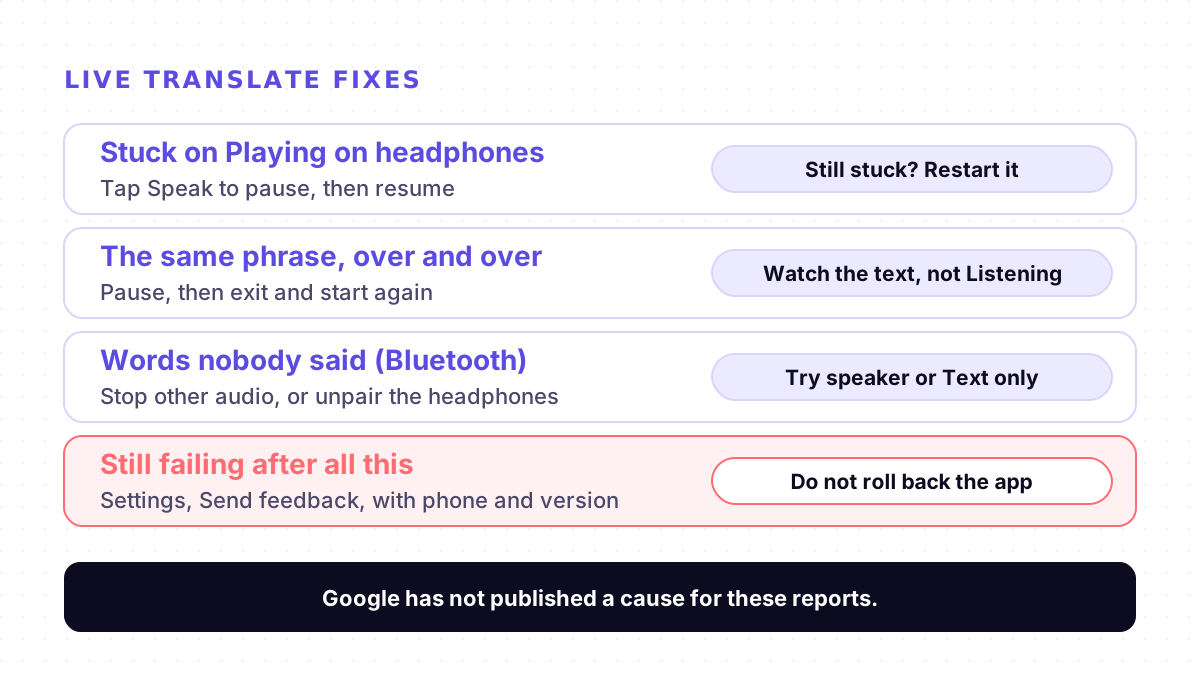
Fixes, symptom by symptom
These steps come from Google's help page and from what the reporters tried. None is an official fix for the bugs above.
1. Stalls on "Playing on headphones". Tap Speak to pause, then tap it again to resume. Google's help page says Speak pauses and resumes translation. If it stays stuck, tap Back to leave Live translate and start it again.
2. Repeats the same phrase. Pause the same way. If the phrase keeps coming back, exit and restart. In the September report this loop happened while the app still showed Listening, so watch the text, not the status.
3. Shows words nobody said, with Bluetooth connected. Stop any music, video or other audio on the phone first: the November report says it happens when audio is playing. If it continues, disconnect the Bluetooth headphones and use the phone itself.
4. Use the speaker or text instead of headphones. Google's help page says Live translate works with or without headphones. Conversation mode plays translations out loud and you take turns, Text only plays no audio, and Custom settings lets you choose text only, speaker or headphones. In Listening mode you can hold the phone to your ear instead of wearing headphones.
5. Keep the app updated, and do not roll back. Google asks for the latest app version. Rolling back did not help the September reporter.
6. Check the background basics if it stops when you leave the app. Google says Live translate keeps running when you switch apps or the screen locks. In a separate September 2026 thread, a user on version 10.35 found it stopped as soon as they left the app, even with microphone permission, notifications and unrestricted battery use allowed. If you have the same problem, check those three settings first.
7. Send feedback. In the app, tap Settings, Send feedback, Get started. Include your phone model, app version, languages and headphones. A Google Product Expert replied in both threads that Google acts on problems reported by many users, and in September added that Google does not respond to feedback. In the November thread they also suggested it is most likely a device issue; the poster had seen it on two brands of phone.
Pausing and restarting will not cure a bug, but it can get you through a conversation until Google ships a change. If you use Samsung's own Interpreter with Galaxy Buds instead, its settings are different: see our Samsung Interpreter fixes.
When the app is fine but missing
If you do not see Live translate at all, that is a different problem: availability, not a bug. We covered where Google's live translation lives, and why it can be missing, in Can Gemini translate a conversation in real time?.
Where Mingle fits
Mingle is our product. It runs in the browser on any phone or computer with nothing to install, translates speech in 60+ languages in any combination, and guests can start without an account. In a Mingle session, the Devices panel lets you choose which microphone the session uses, so you can keep Bluetooth earbuds for listening and pick the phone's own microphone for speech. Read aloud speaks the translation with your device's built-in voice. If Live translate keeps looping before an important conversation, a browser session on a second phone is a fallback. We compare the two on Mingle vs Google Translate conversation mode, and travel setups are on our travel page.
Mingle does not fix Google Translate, and it has limits of its own. It needs an internet connection and has no offline mode, while Google offers offline live translation on some Pixel phones. Mobile browsers pause the microphone when the screen locks, so keep the screen on. Free sessions run up to 5 minutes. Like Live translate, it is machine translation, not a human interpreter.
Sources
Checked on 8 November 2026.
- Google Translate Community: Live Translate stops or loops after a few seconds on Galaxy S23 Ultra (24 September 2026)
- Google Translate Community: Bug report, random speech recognition in Conversation mode with Bluetooth headphones (about 2 November 2026)
- Google Translate Community: Live Translate microphone turns off in the background (18 September 2026)
- Google Translate Help: Hear live speech to speech translations with live translate (Android)
- Google AI Studio docs: Live translation with Gemini Live API
- Google: Gemini 3.5 Live Translate is here (9 June 2026)
Drafted with AI assistance, edited and fact-checked by Tabish Irfan. How we write and check articles
FAQ
Why does Google Translate Live translate stop after a few seconds?
Google has not published a cause. One Galaxy S23 Ultra owner reported on 24 September 2026 that after an update Live translate switched to Playing on headphones, played one fragment and did not return to Listening. The same happened on a friend's S23 Ultra. Tap Speak to pause and resume, restart Live translate, and send feedback from the app if it keeps happening.
Why does Live translate keep repeating the same phrase?
In the same September 2026 report, recognition got stuck repeating "What's happening?" while the app still showed Listening, and the translation repeated with it. It happened with both Galaxy Buds and AirPods. Pausing and restarting is the only step users describe; there is no official fix yet.
Why does Google Translate hear words when nobody is talking?
A user reported on the Google Translate Community, about 2 November 2026, that Conversation mode shows and reads aloud random words when Bluetooth headphones are connected and audio is playing, and that it does not happen without Bluetooth. Stop other audio, or disconnect Bluetooth and use the phone's speaker. Google's developer docs for the same translation model say not all background audio may be ignored.
Does reinstalling an older version of Google Translate fix Live translate?
It did not for the September 2026 reporter. They reinstalled the exact version that had worked, and it no longer showed the same Live translate screens, which they took as a sign that part of the feature is controlled on Google's servers. Keep the app updated instead.
Can I use Live translate without headphones?
Yes. Google's help page says you can use live translate with or without headphones. Conversation mode plays translations on the phone's speakers or headphones, Text only plays no audio, and Custom settings lets you choose text only, speaker or headphones.
How do I report a Live translate bug to Google?
In the Google Translate app, tap Settings at the top right, then Send feedback, then Get started. A Google Product Expert on the community forum said feedback goes directly to the developers, that Google does not respond, and that an issue is investigated if it is found at scale.
Keep reading
Related posts
Guides Live Translate Voice Keeps Changing? Why the Translated Voice Switches From Male to Female
Google's Live translate switching between male and female voices, or ignoring the voice you picked? Why the voice copies the speaker, and what to try.
6 min read
Guides Samsung Interpreter Not Working? Galaxy AI Translation Fixes for Buds, Chats and Calls
Galaxy Buds silent in Interpreter, chats not translated after One UI 8.5 or 9, a missing language? Causes and fixes from Samsung's pages and forum.
7 min read
Guides AirPods Live Translation Not Working? Five Checks, One Known Crash, and a Fallback
AirPods Live Translation won't start, crashes or lacks your language? Five checks for iPhone, AirPods, Apple Intelligence and languages, plus a fallback.
5 min read
Try live translation free
No app install. Any phone. 60+ languages.
Start free session