Meetings
Zoom Voice Translator Not Showing? Why the Button Is Missing and What to Check
Paid for Zoom's Live Translation add-on but no Voice Translator button? The four things Zoom requires, where the setting hides, and what to do next.
- troubleshooting
- zoom
- speech-to-speech
Paying for a feature and then not finding the button is a special kind of annoying. On 14 October 2026, a Zoom user posted on the Zoom Community that Voice Translator, Zoom's spoken translation feature, does not appear in the meeting toolbar or in the More menu. They had bought and assigned the Live Translation add-on, turned Voice translator on in the account and personal settings, updated the Windows desktop app to 7.2.1, and restarted and signed in again. Nothing changed. The next day, a second user on a Pro account who had also paid for the add-on replied that it was not showing for them either. Two weeks earlier, on 30 September 2026, a Pro account owner had reported the same missing icon, after Zoom's support chat confirmed their settings were correct.
When we checked on 11 November 2026, neither thread had an answer from Zoom. Some of these cases may need Zoom to look at the account. But the button depends on several separate switches, and it is worth ruling each one out first.
What Zoom requires before the button appears
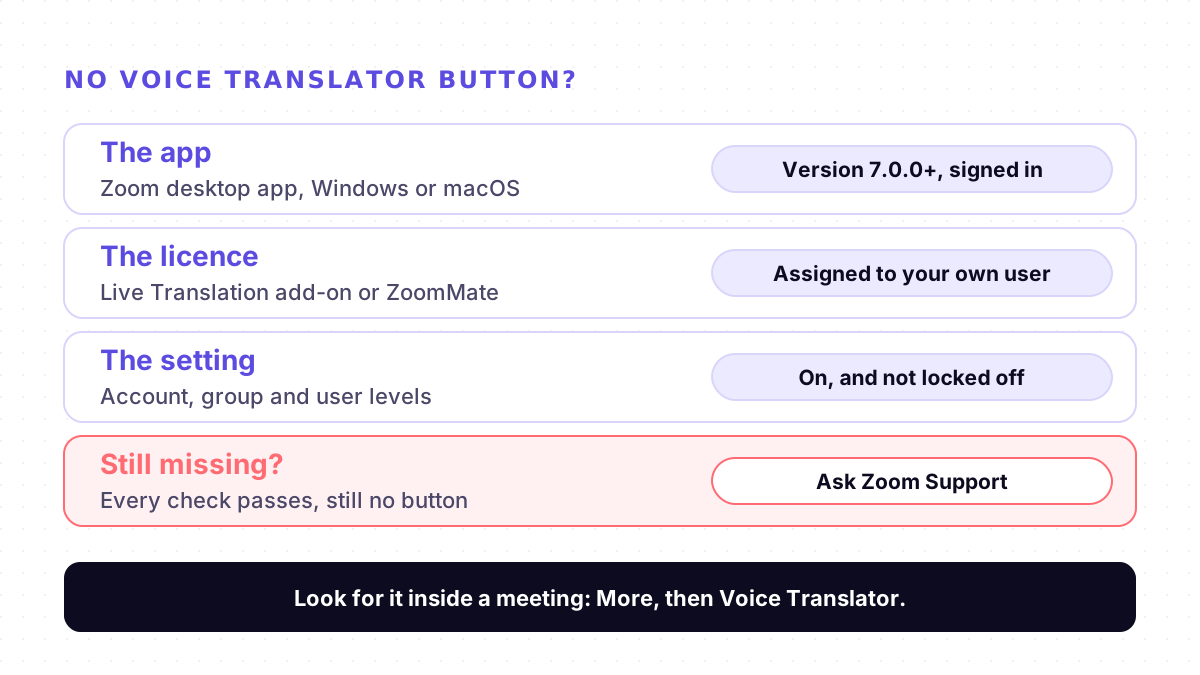
Zoom's help page for using Voice translator lists four requirements:
- An eligible account. The page lists Basic, Pro, Business and Enterprise accounts. Zoom's launch post of 22 July 2026 named Pro, Business and Enterprise.
- The Live Translation add-on or ZoomMate. Zoom notes that ZoomMate's advanced AI features use AI credits.
- Voice translator turned on. An account owner or admin switches it on in the web portal.
- The Zoom desktop app. Windows or macOS, version 7.0.0 or higher.
Zoom also says the speaking and listening languages can only be set during a meeting. So the feature does not show up in the app's settings before you join. It shows up inside a meeting, under More.
The setting has three levels, not one
Zoom's page on enabling or disabling Voice translator describes the same toggle in three places, each under Meeting, In Meeting (Advanced):
1. Account. Admin Center, Settings, Meeting tab. An admin can lock it here so users cannot change it.
2. Group. Admin Center, Users, Groups, the group's name, Edit product settings, Meeting tab. Zoom says changes here apply only to users in that group, and the group setting can also be locked.
3. User. User Management, Users, your name, Settings, Meeting.
The October reporter checked the account and personal settings. If your user belongs to a group, the group has its own toggle, and that is worth checking too.
What to check, in order
1. Use the desktop app, signed in. Zoom's steps start with "Sign in to the Zoom desktop app". A browser tab or the phone app is not on Zoom's list. Update the app if it is older than 7.0.0.
2. Look under More, inside a meeting. Zoom's path is More, then Voice Translator.
3. Make sure the licence is on your user. In the September thread, a Zoom Community Super Champion's advice was to make sure the licence is associated with the user who wants to use it. Ask your admin to confirm it in the Admin Center.
4. Check all three setting levels. Account, group and user, as above, and look for a lock icon that keeps it off.
5. Quit fully and sign in again after any change. It is cheap to try, though it did not help the October reporter.
6. Check your languages. Zoom launched with five languages; its help page now lists nine: English, Chinese, French, Japanese, Spanish, German, Italian, Arabic and Portuguese. If your language is not there, Voice Translator will not help, even when the button appears.
7. Then contact Zoom Support. If every check passes, Zoom has to look at the account. The October reporter wrote that they could not find a direct way to reach a person. Give support your account type, add-on, app version and operating system, so they do not start from the basics.
Once it works, expect a short wait. Zoom says Voice Translator gives near real-time interpretation for short speeches, and for long continuous speech it plays the translated audio after the speaker pauses. Our guide to live translation lag explains why longer sentences take longer.
Voice Translator and Translated Captions are separate
Voice Translator speaks the translation aloud. Translated Captions shows it as text. Zoom says Voice translator builds on its translated captions technology, but the two features have different plan rules and settings, so having one does not switch on the other. Our Zoom translation guide covers Translated Captions, its plan requirements and its own missing-option checklist.
Where Mingle fits
Mingle is our product, and it does not fix Zoom. It does not join Zoom calls. Mingle Meet is its own meeting room: the host signs in to a free Mingle account and shares a link, and guests open it in a browser on a phone or laptop, with nothing to install, no account and no licence. Each person reads captions and can hear speech in the language they choose, across 60+ languages, in any combination. Our live meeting translation page shows how it works. If you need translation inside the Zoom call itself, a tool built for that, such as DeepL Voice, is closer; we compare it on Mingle vs DeepL Voice.
The trade-offs are real. A Mingle meeting is a separate call, so it does not help when everyone must stay in Zoom. It needs an internet connection, and free sessions run up to 5 minutes. It is machine translation, not a human interpreter, so confirm anything important with the person you are talking to.
Sources
Checked on 11 November 2026.
- Zoom Community: Voice Translator icon not appearing in meeting toolbar or More menu (Live Translation add-on purchased) (14 October 2026)
- Zoom Community: Invoice Translator Icon does not appear on the tool control bar (30 September 2026)
- Zoom Community: AI Voice Translator, can my meeting participants access it?
- Zoom Support: Using the Voice translator for meetings
- Zoom Support: Enabling or disabling Voice translator for meetings
- Zoom blog: Live voice translation in Zoom (22 July 2026)
Drafted with AI assistance, edited and fact-checked by Tabish Irfan. How we write and check articles
FAQ
Why is Voice Translator not showing in my Zoom meeting?
Usually one of four requirements is missing: you are not in the Zoom desktop app for Windows or macOS, version 7.0.0 or higher; your own user has no Live Translation add-on or ZoomMate assigned; the Voice translator setting is off at account, group or user level; or you are looking outside a meeting. Zoom says the feature lives under More in the meeting toolbar. Two paying users reported it missing with all of this in place, in September and October 2026, so it can also need Zoom Support.
Where is Voice Translator in Zoom?
Inside a meeting, in the Zoom desktop app. Zoom's help page says to click More in the meeting controls toolbar, then Voice Translator, and then choose My speaking language and Language you want to hear. These settings can only be changed during a meeting, so you will not find them in the app's settings before you join.
Does Zoom Voice Translator work in the web app or on a phone?
Zoom's help page lists the Zoom desktop app for Windows and macOS, version 7.0.0 or higher, as a requirement. It does not list the web app, iPhone, iPad or Android. If you are trying from a browser or a phone, switch to the desktop app first.
Which languages does Zoom Voice Translator speak?
Zoom launched Voice Translator in July 2026 with five languages. Its help page, checked on 11 November 2026, lists nine: English, Chinese, French, Japanese, Spanish, German, Italian, Arabic and Portuguese. Translated Captions, Zoom's text-only feature, covers more languages but is a separate feature with its own plan rules.
Do my meeting participants need the Live Translation add-on too?
Zoom's help pages do not answer this directly. They say participants can turn on Voice Translator during a meeting, and they list the add-on or ZoomMate as a requirement. A Zoom Community Super Champion, who is not a Zoom employee, wrote that availability depends mainly on the host's account. Ask Zoom Support before you rely on it for a meeting with outside guests.
Keep reading
Related posts
Guides Live Translate Voice Keeps Changing? Why the Translated Voice Switches From Male to Female
Google's Live translate switching between male and female voices, or ignoring the voice you picked? Why the voice copies the speaker, and what to try.
6 min read
How it works Why Live Translators Get Names Wrong, and How to Get Them Through
In one test, live translation turned British Airways into 'Briti shareway'. Why names break more than other words, and eight habits that get them through.
4 min read
How it works Why Live Translation Lags Behind the Speaker, and How to Close the Gap
Live translation often trails the speaker by a few seconds. Where the delay comes from, which part you can fix, and why reading beats waiting to listen.
5 min read
Try live translation free
No app install. Any phone. 60+ languages.
Start free session