Guides
Microsoft Translator's Group Conversation Is Gone: What to Use Instead
Microsoft retired the Translator app's multi-device conversation on 30 June 2026. What it did, why guides still show it, and what replaces each use.
- apps
- troubleshooting
- live translation
If you opened Microsoft Translator this term to start a group conversation with a code, you probably found that it no longer works. The release note for version 26.7.1 of the iPhone app, dated 30 June 2026, is one line: the multi-device conversation feature has been retired. The app's description on the App Store now carries the same note.
The confusing part is that much of the web has not caught up. When we checked on 30 October 2026, Microsoft's own page for parent-teacher conferences still told teachers to open the multi-device conversation feature and share a QR or 5-digit conversation code, and a third-party overview of the app updated on 24 August 2026 still listed the feature as available. Here is what the feature did, what is left, and what replaces each way people used it.
What the conversation feature did
Each person joined one conversation from their own phone or computer, by scanning a QR code or typing a short code, and read what others said in their own language. Microsoft's education pages describe it helping English language learners and deaf or hard-of-hearing students or parents follow a class or a one-to-one chat, and its help page covers a presenter mode for someone speaking to a room. Microsoft's advice for conferences was to bring an extra device for parents who did not have one.
None of that works now. A code from an old handout or slide will not open anything.
What the Translator app still does
The App Store listing still offers text translation in more than 100 languages, real-time speech translation and translation of text in images. For two people on one phone, that may be all you need. What is missing is the shared room: several people, several devices, one conversation.
What to use instead, by situation
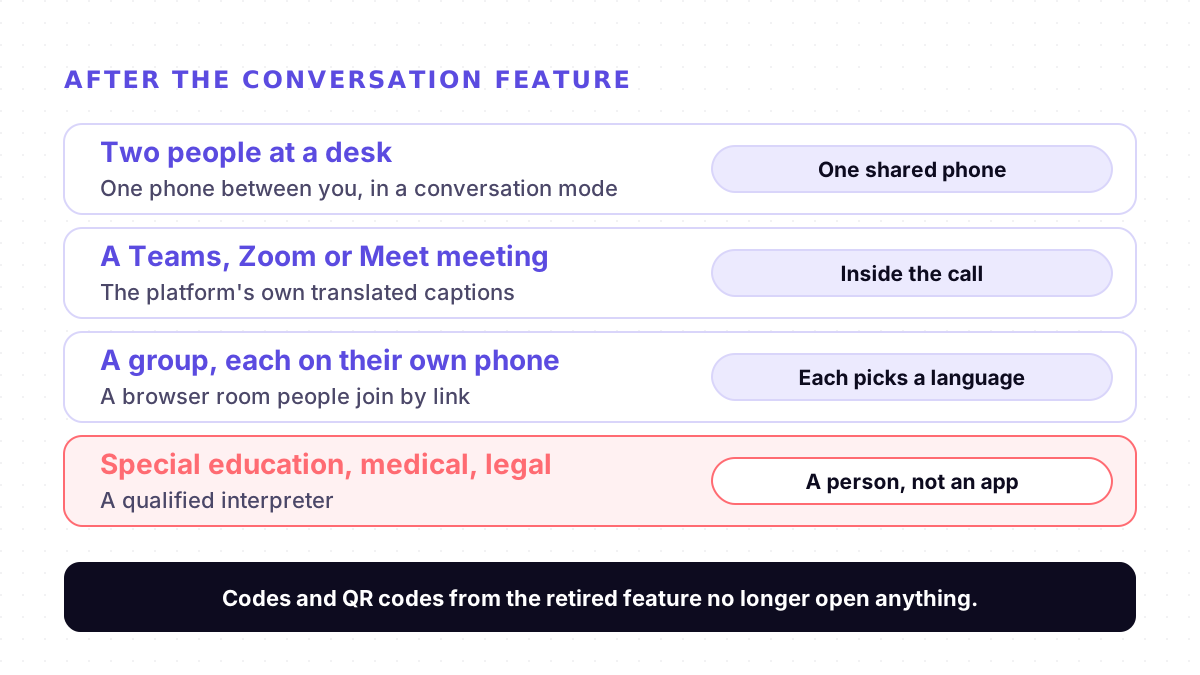
1. Two people at a desk or counter. One phone between you is enough. Microsoft Translator still translates speech, and Google Translate's live translate on Android has a Conversation mode where you take turns and translations play aloud, plus a Face to face mode that splits the screen so each person reads their own side. Google's help page says the microphone detects when one language stops and the other starts. Our comparison with Google Translate's conversation mode covers where each one fits.
2. A meeting that already happens on Teams, Zoom or Google Meet. Use the platform's own translated captions, so nothing extra joins the call. Plans and language lists differ: see our Microsoft Teams live translation guide.
3. A group where each person follows on their own phone. This is the gap the retirement left. You need a room that people join by link, where each person picks the language they read. In the same room, keep only the current speaker's microphone on, so one voice is not picked up by several phones.
4. Special education, discipline, medical or legal conversations. Book a qualified interpreter. Machine translation can help with the conversation around the meeting, but it is not a substitute when the details have to be exact.
Where Mingle fits
Mingle's live meeting translation is a meeting room in the browser. You start a meeting from the Meeting page and share the link or code; people open it on a phone or laptop with nothing to install and no account. Each person chooses the language they read, so one parent can read Arabic while another reads Spanish and the teacher reads English, in 60+ languages in any combination, and anyone can have the translation spoken aloud instead. You can start a meeting without an account; to schedule ahead, invite people or use a waiting room, log in to a free account. For a single family at a table, Mingle's face-to-face mode runs on one phone between you. See how schools use it in our parent-teacher meetings guide.
For transparency: Mingle is our product, and it is not a drop-in copy of Microsoft's feature. It needs a data connection, a meeting runs for up to an hour, free use has limits, and guests without an account join on a limited free allowance for their device. It is machine translation, not a certified interpreter, and it is not HIPAA compliant. If your meetings already run on Teams, Zoom or Meet and their captions cover your languages, those are simpler.
Sources
Checked on 30 October 2026.
- Apple App Store: Microsoft Translator (version 26.7.1 release note, 30 June 2026)
- Microsoft Translator: Parent-teacher conferences
- Microsoft Translator: Live conversations in education
- Microsoft Translator: Multi-device conversation help
- AI Chat Daily: Microsoft Translator in 2026 (updated 24 August 2026)
- Google Translate Help: Hear live speech to speech translations with live translate
Drafted with AI assistance, edited and fact-checked by Tabish Irfan. How we write and check articles
FAQ
Is Microsoft Translator's multi-device conversation still available?
No. The release note for version 26.7.1 of the Microsoft Translator app on the App Store, dated 30 June 2026, says the multi-device conversation feature has been retired, and the app's description repeats it. Sharing a conversation code no longer opens a room where each person joins on their own device.
Can I still translate a conversation in the Microsoft Translator app?
On one device, yes. The App Store listing still offers real-time speech translation, text translation in more than 100 languages and translation of text in images. What is gone is the shared room that several people joined from their own phones.
Why do Microsoft's pages still explain how to join with a code?
When we checked on 30 October 2026, Microsoft's parent-teacher conference page and its multi-device conversation help page still described the feature, with no retirement notice. The retirement is stated in the app's release notes and description, so follow those.
What can a school use instead for parent-teacher conferences?
For one family at a table, a conversation mode on one phone works. For several families or languages at once, use a meeting room that each person joins from their own phone and reads in their own language. For special education, discipline or health matters, book a qualified interpreter.
Is there a replacement where everyone uses their own phone without installing an app?
Browser meeting rooms do this. In Mingle, each person opens one link, picks the language they read, and can also hear the translation spoken, in 60+ languages in any combination. Guests need no app and no account. It is machine translation, not a certified interpreter.
Keep reading
Related posts
How it works Why Live Translators Get Names Wrong, and How to Get Them Through
In one test, live translation turned British Airways into 'Briti shareway'. Why names break more than other words, and eight habits that get them through.
4 min read
Guides AirPods Live Translation Not Working? Five Checks, One Known Crash, and a Fallback
AirPods Live Translation won't start, crashes or lacks your language? Five checks for iPhone, AirPods, Apple Intelligence and languages, plus a fallback.
5 min read
How it works Why Live Translation Lags Behind the Speaker, and How to Close the Gap
Live translation often trails the speaker by a few seconds. Where the delay comes from, which part you can fix, and why reading beats waiting to listen.
5 min read
Try live translation free
No app install. Any phone. 60+ languages.
Start free session