Guides
Samsung Interpreter Not Working? Galaxy AI Translation Fixes for Buds, Chats and Calls
Galaxy Buds silent in Interpreter, chats not translated after One UI 8.5 or 9, a missing language? Causes and fixes from Samsung's pages and forum.
- troubleshooting
- earbuds
- live translation
Samsung's Interpreter can go quiet halfway through a conversation. On 7 October 2026, a Galaxy S25 Ultra owner using Galaxy Buds Pro 3 replied to a Samsung Community thread about Conversation mode: after the One UI 9 changes, the translation was not read aloud in their Buds until they turned off the Buds' Calls switch in Bluetooth settings. The thread began in November 2025, when another S25 Ultra owner with Buds 3 wrote: "Translation doesn't start until the speaking stops."
A second thread is still active too. In June 2026, a Galaxy S23 owner reported that Galaxy AI chat translation stopped working after the One UI 8.5 update: WhatsApp and Instagram chats were no longer translated. In late September they wrote that it "only translates some of the messages", and on 27 October 2026 a Galaxy A57 owner on One UI 9.0 reported the same problem.
These are user reports, and Samsung has not published a known issue for either. But the fixes that worked, and Samsung's own setup pages, cover most of what goes wrong.
Three Galaxy AI features, three sets of settings
Galaxy AI translates speech and text in different places, and each has its own switches.
- Interpreter is for face-to-face talk. You open it from the Quick Panel. Conversation mode shows a microphone for each language. Listening mode translates one speaker, for example a presentation.
- Chat translation (part of Writing assist, called Chat assist on some phones) translates messages from the Samsung Keyboard in apps such as Samsung Messages, WhatsApp, Instagram DMs, Google Chat, Signal, LINE, KakaoTalk and Tango, according to Samsung's UK page.
- Live translate in Call assist translates phone calls in the Phone app. We compared it with iPhone and Pixel in how to translate a phone call in real time.
Samsung's US pages say these need Android 14 with One UI 6.1 or higher, and that some features need an internet connection.
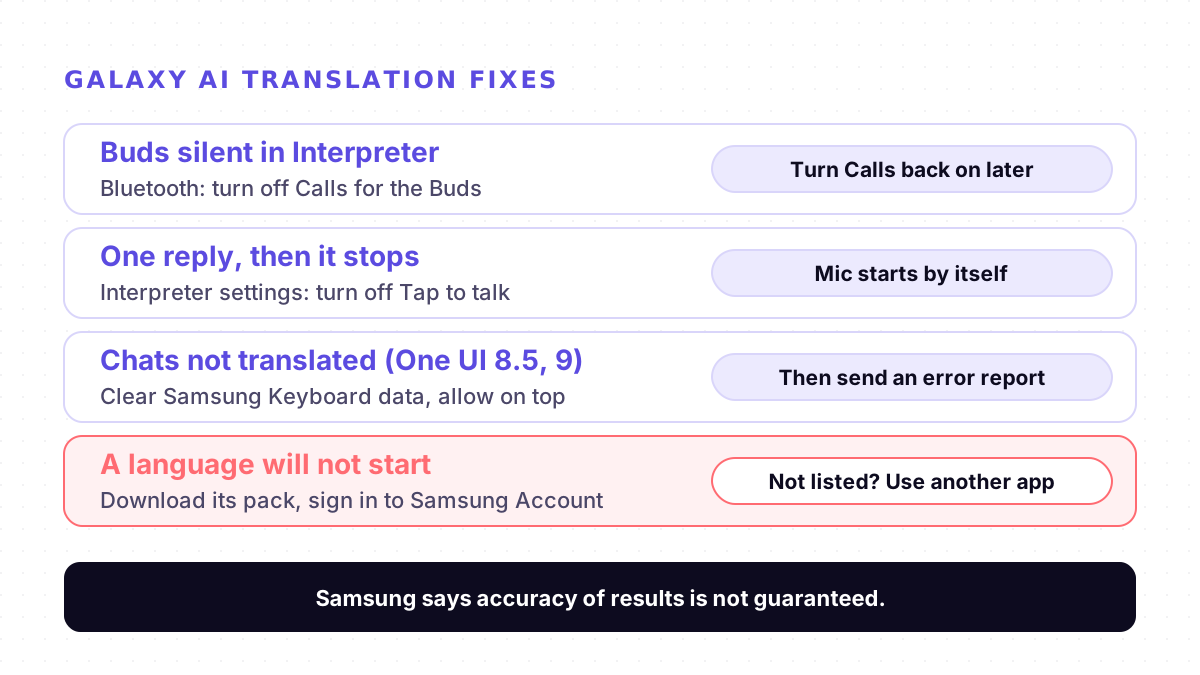
Fixes for Interpreter and Galaxy Buds
1. Know where the sound should go. Samsung's Buds3 page says you hear the other person's translation through your Buds, and when you answer, your phone's speaker plays your translated speech. If the Buds are not available, Samsung says the translation is shown on screen.
2. If the Buds stay silent, try the Calls switch. The 7 October 2026 workaround: open Bluetooth settings, tap the gear next to your Buds, open the connection settings and turn off Calls. The user said Interpreter then read the translation aloud. Turn Calls back on afterwards, or your Buds will not carry phone calls. The user also sent feedback to Samsung, so this may change in an update.
3. If translation waits for a tap after every turn, turn off Tap to talk. In Interpreter's settings, Samsung says that with Tap to talk on, both people must tap their microphone each time they speak. With it off, the other microphone starts automatically when you finish. In the November 2025 thread, Samsung's moderator suggested exactly this, and the poster said it worked better.
4. Download the language pack. Samsung's US page says English and Spanish are pre-installed in Interpreter and other languages need a free download. In Interpreter, open the settings and choose the language packs.
5. Sign in. Samsung's Australian page says Interpreter requires a Samsung Account login, and its US page says Galaxy AI features may be limited if you are not signed in to your Samsung and Google accounts.
6. For one-way translation, use Listening mode. In July 2026, a Buds4 Pro owner asked Samsung for a "translate only incoming speech" option. The moderator pointed to Listening mode, which translates one speaker. The poster replied that it does not cover regular phone calls, which is what Live translate in Call assist is for.
Fixes for chat translation after One UI 8.5 or 9
These combine Samsung's setup pages with the steps its moderator gave in the June 2026 thread.
1. Check that it is on. Settings, Galaxy AI, Writing assist, then turn on Chat translation. On older software the path is Settings, Advanced features, Advanced intelligence.
2. Start it from the keyboard. Samsung's US page says to tap the Writing assist icon (three stars) on the Samsung Keyboard toolbar, choose Chat translation and pick the language at the top. It only works with the Samsung Keyboard.
3. Clear Samsung Keyboard data and allow Samsung Keyboard to appear on top.
4. Check that Samsung Keyboard and Android System Intelligence are on, and that chat translation is switched on for the app you use, such as WhatsApp or Instagram.
5. Restart the phone. The moderator also suggested clearing the data of Android personalization service; the poster could not find that option.
6. Send an error report if nothing works. That was Samsung's next step in the thread. On 25 October 2026, another user said removing the updates of their messaging app in the Play Store fixed it, without saying which app. Nobody else confirmed that, so treat it as a last resort.
When it works but the translation is poor
Fixing settings does not fix accuracy. In July 2026, a Galaxy S25 owner wrote on Samsung's forum that Interpreter "was slow, lagged badly in real time", with many translation errors. Samsung itself says accuracy of results is not guaranteed, and for Live translate on calls, that only one person should use it at a time. Speak in short sentences, one person at a time, and away from noise. For why some delay is built into every live translator, see why live translation lags.
Where Mingle fits
Mingle is our product. It runs in the browser on any phone or computer with nothing to install, so it also works on phones that are not Galaxy models, with AirPods, Galaxy Buds, wired earphones or no earphones at all. It translates speech in 60+ languages in any combination (the full list is on our Languages page), and guests can start without an account. If your language is not on Samsung's list, that is where it can help. More options for travel are on our travel page, and earbuds are compared on Mingle vs translator earbuds.
It does not replace Galaxy AI inside your phone. Mingle does not translate your WhatsApp chats or your phone calls, it needs an internet connection and has no offline mode, and mobile browsers pause the microphone when the screen locks. Free sessions run up to 5 minutes, and like Interpreter it is machine translation, not a human interpreter.
Sources
Checked on 6 November 2026.
- Samsung Community: Interpreter in Conversation Mode (November 2025, reply of 7 October 2026)
- Samsung Community: Galaxy AI chat translation not working since One UI 8.5 update (June to October 2026)
- Samsung Community: Please add a "Translate only incoming speech" option to Live Translate (22 July 2026)
- Samsung Community: Feedback and complaint regarding Samsung Interpreter (26 July 2026)
- Samsung US: Use features with Galaxy AI on your Galaxy phone and tablet
- Samsung US: Using Galaxy AI features with your Galaxy Buds3, Buds3 Pro, or Buds3 FE
- Samsung Australia: How to use the Interpreter setting on my Galaxy device
- Samsung Caribbean: How to set up and use the Interpreter app on Galaxy devices
- Samsung UK: How to use Writing Assist
- Samsung US: Use Writing assist on Galaxy phones and tablets
- Samsung US: Call assist: Live translate calls on your Galaxy phone
Drafted with AI assistance, edited and fact-checked by Tabish Irfan. How we write and check articles
FAQ
Why can't I hear the translation in my Galaxy Buds?
Samsung's Buds3 page says that in Interpreter you hear the other person's translation in your Buds, while your own translated speech plays from the phone's speaker. If the Buds stay silent, one user on Samsung's forum (7 October 2026) fixed it by opening Bluetooth settings, tapping the gear next to the Buds and turning off Calls. Turn Calls back on when you need the Buds for phone calls.
Why does Interpreter stop after one reply?
That is how Tap to talk works. Samsung says that with Tap to talk on, both speakers must tap their microphone icons each time they speak. With it off, the other person's microphone turns on automatically after you finish. A Samsung moderator suggested turning it off for a user whose translation waited for taps.
Why did Galaxy AI chat translation stop working after One UI 8.5?
Samsung has not published a cause. In a forum thread opened in June 2026, its moderator suggested clearing Samsung Keyboard data, allowing the keyboard to appear on top, checking that Samsung Keyboard and Android System Intelligence are on, and checking the per-app toggles. The poster said this did not help and was asked to send an error report. Other users reported the same problem through October 2026.
How do I make Interpreter translate only the other person?
Use Listening mode. Samsung describes it for one-way speech such as a talk or a presentation: you choose the speaker's language and tap the microphone. A Samsung moderator pointed a user to it in July 2026. That user said it does not cover regular phone calls, where Samsung's Live translate in Call assist is the feature to use.
Which languages does Samsung Interpreter support?
Samsung's US support page lists 20 languages for Interpreter and Live translate. English and Spanish come pre-installed in the Interpreter app, and other languages need a free download. Lists differ between Samsung's regional pages, so check the language picker on your own phone.
Does Samsung Interpreter need an account or internet?
Samsung's Australian help page says Interpreter requires a Samsung Account login, and its US page says Galaxy AI features may be limited or unavailable if you are not signed in to your Samsung and Google accounts. Samsung also says some features need an internet connection.
Keep reading
Related posts
Guides AirPods Live Translation Not Working? Five Checks, One Known Crash, and a Fallback
AirPods Live Translation won't start, crashes or lacks your language? Five checks for iPhone, AirPods, Apple Intelligence and languages, plus a fallback.
5 min read
Guides Google Translate Live Translate Not Working? Loops, Stalls and Phantom Words With Headphones
Live translate stuck on Playing on headphones, repeating one phrase, or hearing words nobody said with Bluetooth? What users report and what to try.
6 min read
Guides Meta Glasses Live Translation Not Working? Language Packs, Errors and Fixes
Ray-Ban Meta or Meta Ray-Ban Display live translation stuck on "Something went wrong" or a language pack error? Causes, fixes and the language list.
6 min read
Try live translation free
No app install. Any phone. 60+ languages.
Start free session