Guides
Meta Glasses Live Translation Not Working? Language Packs, Errors and Fixes
Ray-Ban Meta or Meta Ray-Ban Display live translation stuck on "Something went wrong" or a language pack error? Causes, fixes and the language list.
- hardware
- troubleshooting
- live translation
Live translation is the reason many people buy Meta's glasses, so it hurts when it will not start. On Meta's community forum, an owner of Meta Ray-Ban Display glasses wrote in January 2026 that starting live translate opened the Meta AI app and showed "Something went wrong" with the note that it could not download the language pack. The thread is still open: on 29 October 2026 another Display owner added that the Meta AI app on their iPhone stopped at "Get started with Meta AI" with "Something went wrong. Please wait and try again later", and that a clean reinstall did not help. A separate thread from January 2026 describes the app crashing whenever the owner tapped Translate.
None of these threads has a confirmed fix from Meta. What follows is what Meta's own help pages require, the fixes other owners suggested, and what to do when your language is simply not on the list.
Why it fails: the app does the work
Meta's help page lists four things to have in place before you use live translation: the glasses connected to the Meta AI app, the latest firmware on the glasses, the latest version of the Meta AI app, and Wi-Fi for languages that need an internet connection. You choose the languages in the app, under "You speak" and "They speak", and the full transcript also shows in the app.
So when translation fails, the cause is usually on the phone: languages not chosen yet, a language pack that has not downloaded, an outdated app, or an app that cannot finish its own setup. The glasses are only the microphone, speaker and, on the Display model, the screen.
Fixes, in order
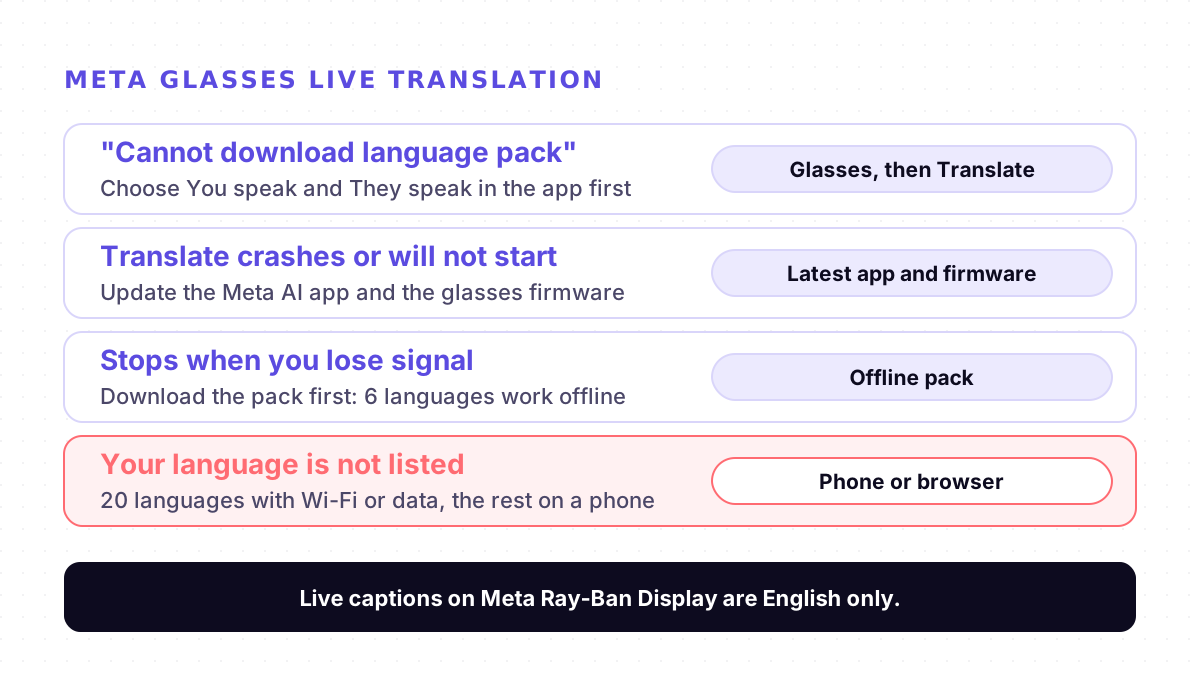
1. Choose both languages, then start. Open the Meta AI app, tap Glasses, then Translate, set "You speak" and "They speak", and tap Start. This was the reply to the language pack error on Meta's forum: set the languages you translate from and into in the app first, then start translation by asking Meta. If several devices are paired, swipe to pick the right one.
2. Update the app and the glasses. Meta asks for the latest Meta AI app and the latest firmware. In the crash thread, the first suggestion was to update the app and restart the phone.
3. Stay on Wi-Fi for the first download. Meta says most languages are ready right away on Wi-Fi. A language pack is what you download for offline use, so a weak connection in the middle of that download is the likely point of failure.
4. Download the pack before you travel. Only six languages work offline after their pack is downloaded: English, Spanish, French, Italian, Portuguese and German. Meta's page says this is not available on Ray-Ban Meta Audio, and advises downloading ahead of time if you expect poor connectivity.
5. Check that your language is on the list. With Wi-Fi or mobile data, Meta lists 20 languages: English, Spanish, French, Italian, Portuguese, German, Hindi, Arabic, Russian, Swedish, Finnish, Chinese (Mandarin), Japanese, Korean, Indonesian, Vietnamese, Thai, Turkish, Greek and Dutch. Older guides list fewer: when live translation rolled out to every Ray-Ban Meta region in April 2025, Engadget reported four languages.
6. If the app fails before translation even starts, report it. The 29 October report is a setup failure in the Meta AI app itself, and reinstalling did not fix it. One forum reply suggested shaking the phone inside the app to send a report to Meta. Until it is fixed, the glasses cannot translate.
To stop a session, say "Hey Meta, stop live translation", tap and hold the touchpad, or tap Glasses and then Stop in the app.
On Meta Ray-Ban Display: captions are English only
The Display model can show text in your line of sight, and Meta's product page describes translated subtitles there. Live captions, the feature that writes out what people say without translating it, are a separate setting: Meta's help page says live captions on Meta Ray-Ban Display are only available in English, and the first time you need to download the language in the Meta AI app. If you expected captions in another language, use live translation instead.
When the glasses cannot help
If the app will not set up, or your language is not one of the 20, translate on your phone instead. For two people, a translator on one phone held between you works. Our translator earbuds comparison and translator earbuds guide cover when wearable hardware is worth it and when a phone is enough, and our travel guide covers the trip itself.
Where Mingle fits
Mingle is our product. It runs in the browser on any phone or computer with nothing to install, and translates speech in 60+ languages in any combination, so pairs that Meta's glasses do not list, such as Urdu, Tagalog, Polish or Ukrainian, are on our Languages page. Guests can start without an account, and the translation can be read on screen or spoken aloud.
It is not a replacement for the glasses' hands-free view. Mingle needs a data connection and has no offline mode, so in places where you would rely on Meta's offline packs, it will not work. Free sessions run up to 5 minutes, and it is machine translation, not an interpreter.
Sources
Checked on 3 November 2026.
- Meta Community Forums: "Something went wrong." (Meta Ray-Ban Display, January 2026, reply 29 October 2026)
- Meta Community Forums: "translation" (app crashes on Translate, January 2026)
- Meta Help Center: How to use live translation on AI glasses
- Meta Help Center: How to use live captions on Meta Ray-Ban Display
- Meta: Translation glasses, real-time AI translation
- Engadget: Meta is bringing smart glasses live translation and AI to more people (23 April 2025)
Drafted with AI assistance, edited and fact-checked by Tabish Irfan. How we write and check articles
FAQ
Why do my Meta glasses say "Something went wrong" when I start live translation?
In the reports we read, the message came from the Meta AI app, either while downloading a language pack or while setting the app up. The reply offered on Meta's forum was to open the Meta AI app and set the languages you translate from and into, then start again. Update the app and the glasses' firmware and stay on Wi-Fi for the download.
Which languages does live translation on Meta glasses support?
Meta's help page lists 20 languages with Wi-Fi or mobile data: English, Spanish, French, Italian, Portuguese, German, Hindi, Arabic, Russian, Swedish, Finnish, Chinese (Mandarin), Japanese, Korean, Indonesian, Vietnamese, Thai, Turkish, Greek and Dutch. Check the Meta AI app for changes.
Does live translation on Meta glasses work offline?
Only for English, Spanish, French, Italian, Portuguese and German, and only after you download each language pack in the Meta AI app. Meta's help page says offline packs are not available on Ray-Ban Meta Audio. Download them before you travel if you expect poor connectivity.
Can Meta Ray-Ban Display show captions in my language?
Meta's help page for live captions on Meta Ray-Ban Display says captions are only available in English, and you download the language in the Meta AI app the first time. Translated subtitles come from the live translation feature, which has its own language list.
The Translate button crashes the Meta AI app. What can I do?
In a Meta forum thread from January 2026, restarting the phone and reinstalling the app did not stop the crash. The suggestions there were to update the app, restart the phone and send a report to Meta from inside the app. If it keeps crashing, translate on your phone until Meta fixes it.
What can I use if my language is not supported on the glasses?
Use a translator on your phone that covers your pair. Mingle runs in the phone's browser with nothing to install, in 60+ languages in any combination, including Urdu, Tagalog, Polish and Ukrainian, and guests can start without an account. It needs a data connection and does not work offline.
Keep reading
Related posts
Guides Microsoft Translator's Group Conversation Is Gone: What to Use Instead
Microsoft retired the Translator app's multi-device conversation on 30 June 2026. What it did, why guides still show it, and what replaces each use.
5 min read
How it works Why Live Translators Get Names Wrong, and How to Get Them Through
In one test, live translation turned British Airways into 'Briti shareway'. Why names break more than other words, and eight habits that get them through.
4 min read
Guides AirPods Live Translation Not Working? Five Checks, One Known Crash, and a Fallback
AirPods Live Translation won't start, crashes or lacks your language? Five checks for iPhone, AirPods, Apple Intelligence and languages, plus a fallback.
5 min read
Try live translation free
No app install. Any phone. 60+ languages.
Start free session